Part 01 · Header
One headline, one photo, one button.
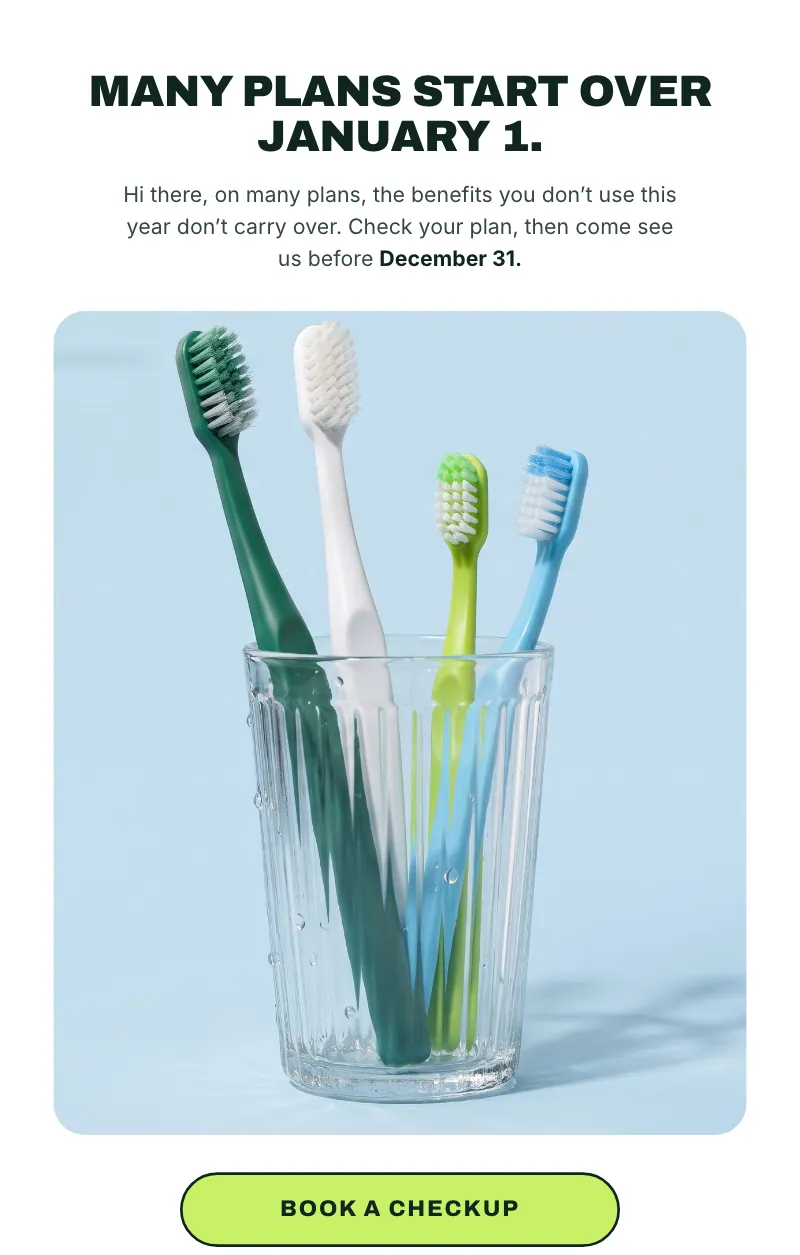
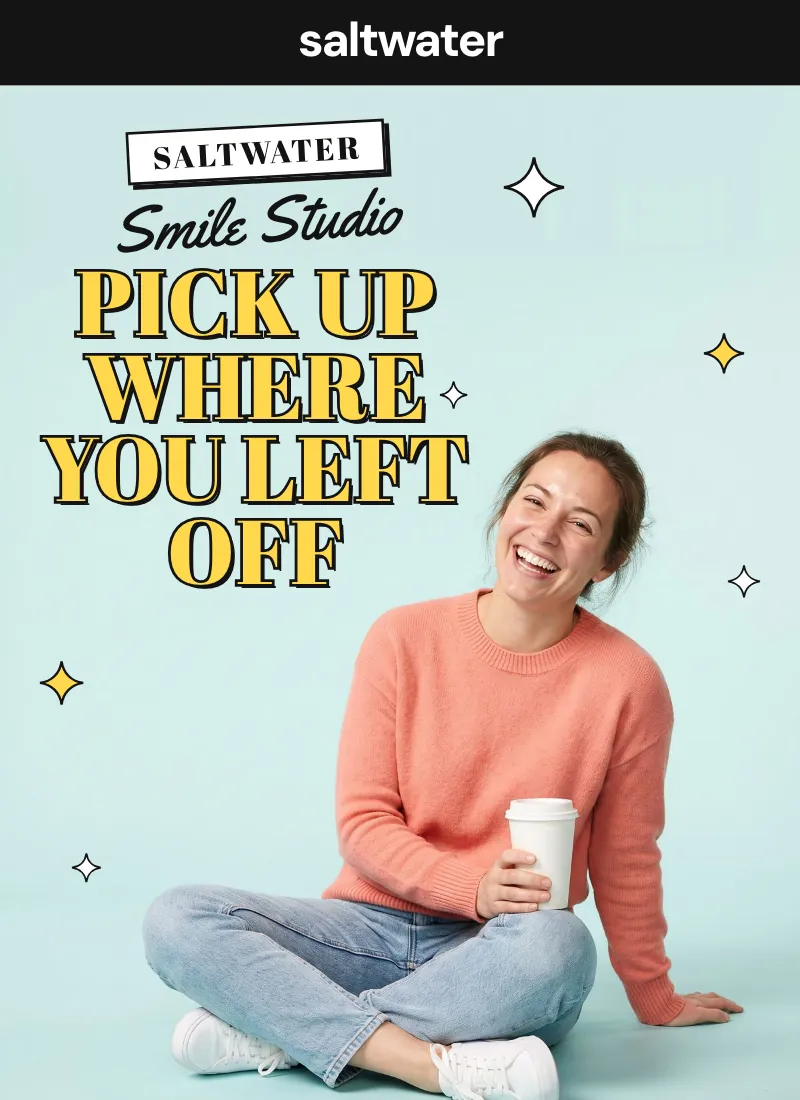
Four to eight words with one highlighted phrase, set on a campaign photo with room for the headline. A pill button sits right under it.
Paste it into ChatGPT or Claude. It asks a few questions about your practice, then builds a newsletter that looks like a brand campaign: the subject lines, the design, an inbox version for your email tool, and tracked links so you know who clicked.
In the reel I showed three newsletters built from this one prompt. Each follows the structure consumer brands use in their emails: a header that sells one idea, one thing your patients forgot, then the visits they can book. The prompt builds every issue in that order.
Four to eight words with one highlighted phrase, set on a campaign photo with room for the headline. A pill button sits right under it.
Tie it to the goal, like many dental plans starting over on January 1. A short headline, two sentences at most, one image and the same button.
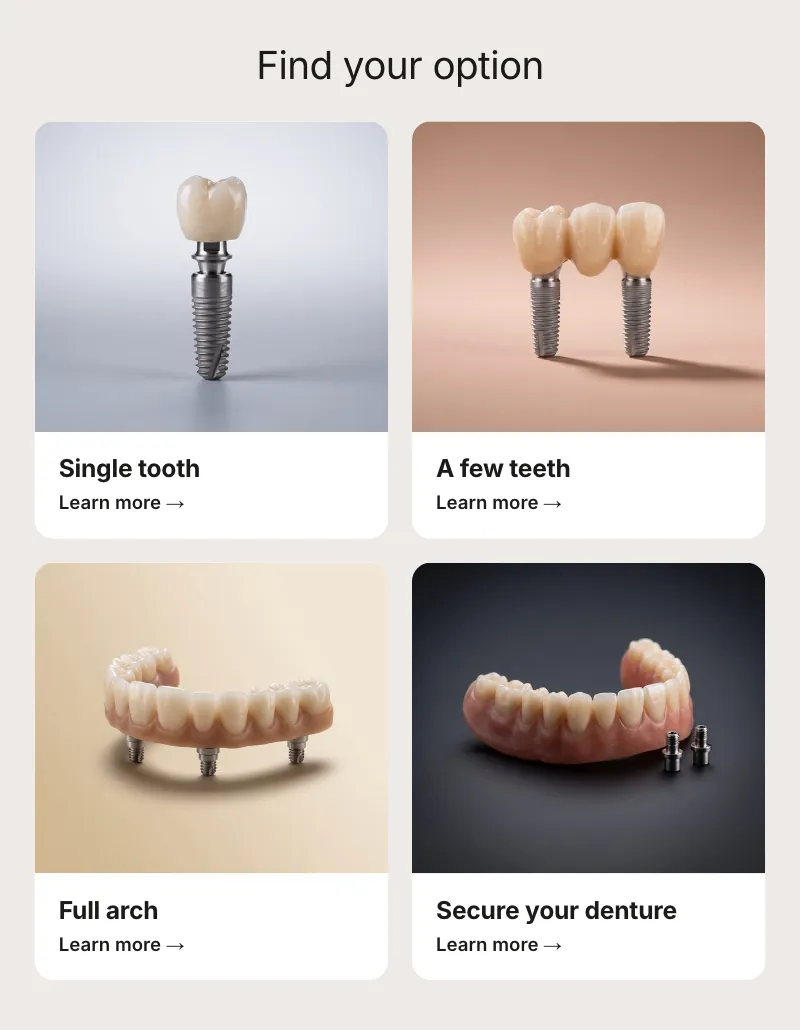
Three or four cards, each with a treatment shot like a product, a title, one line and a small button. This is where your patients click.
I ran the prompt three times with different answers: a family practice, an implant studio and a general practice. Each one picked its own design direction. Hover over a newsletter, or tap it, to scroll it top to bottom.
 Hover to scrollTap to scroll
 Hover to scrollTap to scroll
 Hover to scrollTap to scroll
Example practices made up for this demo, with AI-generated photos. For your patients, use real photos of your team and your office. If you don't have any, the prompt writes you a shot list.
There's nothing to fill in. It asks you eight questions first and doesn't design anything until you answer them.
You are a senior email designer who builds campaign emails for direct-to-consumer brands, now designing a patient newsletter for a dental practice. Your emails look like the ones well-known consumer brands send: image-led, a bold headline over a campaign photo, very little copy, and every section ending in a button. You write like a warm, plain-spoken front desk lead. You will produce one issue in two editions: an animated web edition, and an inbox-safe email I can load into GoHighLevel or any email tool.

## Step 1. Ask me these questions first

Ask them all in one numbered message. Do not design anything until I answer.

1. Practice name, phone, address, booking link, and logo (a file or URL; if I have none, set the name as a wordmark).
2. Brand colors as hex codes, or three words for the feel (for example "warm, coastal, playful").
3. The ONE goal of this issue. Pick one: use remaining insurance benefits before December 31; bring back patients with unscheduled treatment; book consultations for high-value cases (implants, clear aligners, cosmetic); bring back patients overdue for a cleaning; fill same-week openings; get referrals or reviews.
4. Who is reading it: current patients, overdue patients, new leads, or everyone.
5. The three or four visits or treatments you want to feature, and any offer with its exact terms, or "no offer". Never invent an offer, a price, a statistic, a review or a guarantee.
6. Photos: real photos of the team, the office and smiling patients (with consent) are best. If I have none, you will write me a shot list in Step 2.
7. The name the issue is signed from (doctor and team).
8. Send day and how often.

## Step 2. Show me the plan before you build

- Three subject lines under 45 characters (no all caps, no "free!!!", no "act now") and one preheader under 90 characters.
- The design direction you picked from Step 4 and why it fits my practice.
- The outline from Step 3 with the exact words each block will say.
- A photo shot list: for each image, what is in it, the backdrop color, and where the empty space for the headline sits.

## Step 3. Structure: Header, Educate, Products

Every high-performing brand email follows the same three parts. Build in this order:

1. **Header.** Wordmark or logo. A headline of 4 to 8 words with ONE accent phrase (highlighted, colored or italic). A campaign photo: a real person, happy and natural, on a plain colored backdrop, with empty space at the top where the headline sits on the photo. One pill-shaped button directly under the headline.
2. **Educate.** One idea the reader did not know or had forgotten, tied to the goal (for example: many dental plans reset on January 1). A short headline, at most two sentences, one strong image or designed block, and the same button.
3. **Products.** The visits or treatments the reader can book, as three or four cards. Each card: a photo of the treatment shot like a product (an aligner, a crown, a fresh toothbrush, on colored paper), a title, one line, and a small button. This is where readers click.
4. **Trust.** A row of four or five small round line icons with two-word labels about the visit (for example "Kids welcome", "We file your claim"). A real review only if I give you one. No star ratings, no "as seen in" logos.
5. **Closing band.** A second photo, one line, the button, and the phone number as tappable text.
6. **Footer.** The practice name as a giant wordmark, then address, phone, hours, "You are receiving this because you are a patient of [practice]", and {{unsubscribe_url}}.

## Step 4. Design system

- Pick ONE direction and commit to it:
  - **Bold and bright** (family and general dentistry): heavy uppercase sans headlines (Archivo Black or Inter Tight 900), one neon highlighter color behind the accent phrase, pill buttons with a 2 px dark outline, a pale sky backdrop.
  - **Quiet and premium** (implants, cosmetic): a thin elegant serif headline (Newsreader or Cormorant), greige and bone neutrals, small black pill buttons, a frosted glass card floating over the hero photo listing what the visit includes, a 2x2 grid of treatment tiles on soft gradients.
  - **Playful** (younger families, whitening, aligners): a fat retro display headline with a dark outline and an offset shadow, a script font for card titles, a pastel gradient page, saturated color cards per treatment, sparkles and wavy dividers.
  - **Minimal beauty** (cosmetic, spa-style practices): a huge wordmark, lots of white, tall portrait image cards with tiny captions, outlined pill buttons.
- Image-led: photos and designed blocks take up more than half of the email's length. Visible copy above the footer stays between 120 and 170 words. If a block has a paragraph, cut it.
- 600 px wide. Body text 16 px with 1.5 line height, headlines 36 to 48 px (30 px on phones). Spacing on an 8 px scale. Cards and image frames with 16 to 24 px rounded corners.
- Color: one brand color, one accent, and one neutral, with every text and background pair passing WCAG AA contrast.
- Photos look like a brand campaign: studio light, plain colored seamless backdrops, real people with real skin and natural teeth, products and treatments shot like products. Never a collage of stock smiles. Alt text on every image.
- One action: the same button wording every time it appears.

## Step 5. Animated web edition (one HTML file)

- The web edition is the same 600 px email, centered on a tinted page, brought to life.
- Load GSAP 3 and ScrollTrigger from a CDN, pinned to an exact version.
- Hero: the photo settles from scale 1.06 to 1.0 over 1.6 s; the headline lines rise in (y 30 to 0, stagger 0.08 s, ease "power3.out"); the highlighter block swipes in from the left; the button pops in, then breathes every 4 seconds (scale 1 to 1.03).
- Each section reveals as it scrolls into view (ScrollTrigger start "top 85%"): fade up 24 px, 0.7 s, children staggered 0.08 s. Product cards rise one by one; icons tick in; a floating glass card slides up and its checkmarks draw themselves.
- Nothing flashes. Respect prefers-reduced-motion (show everything, no motion), and make sure all content is visible even if JavaScript never runs.

## Step 6. Inbox edition (the one you actually send)

- Email apps do not run JavaScript, so build this one with tables: 600 px, inline CSS, web-safe font fallbacks, every image with width, height and alt, bulletproof pill buttons (with the VML fallback for Outlook), colors that survive dark mode, and the HTML kept under 100 KB so Gmail does not clip it.
- The hero may be one image with the headline baked in, so it looks exactly like the design in every inbox. Give it alt text that says the headline. Everything else stays live text.
- Add a "See the animated version" link to the web edition.
- Merge fields: {{contact.first_name}} with the fallback "there", and {{unsubscribe_url}}.
- Also write a plain-text version.

## Step 7. Tracking

- Put UTM tags on every link: utm_source=newsletter, utm_medium=email, utm_campaign=[issue-slug], utm_content=[hero, card name, or footer].
- In GoHighLevel, make the booking buttons trigger links, so a click can tag the contact and alert the front desk to call them.

## Step 8. Rules

- Write to the patient in the second person: warm, plain English, a 6th to 8th grade reading level, no clinical jargon.
- No made-up statistics, reviews, star ratings, prices, offers, press logos or guarantees. Hedge insurance claims ("many plans"). No before-and-after photos unless I provide real ones with consent.
- No patient health information anywhere.
- Accessible: alt text, tap targets at least 44 px tall, AA contrast.

## Step 9. Deliver

1. index.html: the animated web edition.
2. email.html: the inbox edition.
3. email.txt: the plain-text version.
4. A short launch checklist: the subject line and preheader, anything I still need to fill in, where to host the images, test sends to Gmail, Apple Mail and Outlook, and the send time.
Scroll inside the box to read all nine steps. The copy button grabs every word.
Questions 1 and 2 · Your practiceName, phone, address, booking link, logo and brand colors. No logo? It sets your name as a wordmark.
Question 3 · One goalPick one: benefits before December 31, unscheduled treatment, high value consults, overdue cleanings, open slots or referrals.
Question 6 · Your photosReal photos of your team and office, with consent for any patient. No photos yet? It writes the shot list for you.
Give it to your front desk or office manager. No design tool needed, just the AI you already use and your email tool.
Hit any copy button on this page. It copies the whole prompt, all nine steps, ready to paste.
Paste it into ChatGPT or Claude. It asks about your practice, your one goal, what to feature and your photos before it designs anything.
It shows you three subject lines, a preheader, the design direction, the exact words for each block and a photo shot list. Change anything before it builds.
Load the inbox version into your email tool, send yourself a test in Gmail, Apple Mail and Outlook, then send it to your patients.
Ask for one file at a time so nothing gets cut off. If a reply stops halfway, type "continue". Save each file with the name it gives you.
Claude can show the animated web edition as a preview next to the chat. Ask for the inbox edition and the plain text next.
Run it inside a folder and it writes the files for you, so you can open the web edition in your browser right away.
One issue in two editions, plus the text version and a launch checklist. The plan comes first, so you approve the words before anything gets built.
The same 600 px email as a web page, brought to life: the photo settles, the headline rises in and the cards come up as you scroll. Your email links to it.
The one you send. Built with tables and inline styles for Gmail, Apple Mail and Outlook, with pill buttons and the file kept under 100 KB so Gmail doesn't clip it.
The same issue as plain text, for the text part of the email your email tool sends alongside the designed one.
Your subject line and preheader, anything you still need to fill in, where to host the images, the test sends and the send time.
The prompt tells the AI what it can't do, so your issue stays honest and safe to send.
The prompt picks the direction that fits your practice and commits to it. Photos and designed blocks fill more than half of the email, and the copy above the footer stays between 120 and 170 words.
Heavy uppercase headlines, one highlighter color behind the key phrase, outlined pill buttons. For family and general dentistry.
A thin serif headline, greige and bone neutrals, small black pill buttons and a frosted card over the photo. For implants and cosmetic.
A fat outlined headline with an offset shadow, script card titles, pastel gradients and sparkles. For younger families, whitening and aligners.
A huge wordmark, lots of white, tall portrait image cards with tiny captions and outlined buttons. For cosmetic and spa-style practices.
Illustrative type samples. The prompt sets the real fonts, colors and photos for your practice.

This is the prompt from my reel, and it's yours to keep. Have your front desk or office manager run it next Monday.
If you'd rather hand it off, send me a direct message on Instagram and tell me the one goal for your next issue. My team can design it, write it and set it up in your email tool.
It works in any recent version of ChatGPT or Claude. Free versions can stop partway through long files, so ask for one file at a time and type "continue" if a reply gets cut off.
Real photos of your team, your office and smiling patients (with their written consent) look like your practice, and stock photos don't. If you don't have any yet, the prompt writes a shot list: what is in each photo, the backdrop color and where the headline sits.
Yes. The inbox edition is plain HTML built for email. Paste it into your email tool's custom HTML or code option, host the images where your tool tells you to, and send yourself a test first.
Email apps don't run animation code, so the email you send is built with tables to look right in every inbox. The animated version is a web page your email links to with "See the animated version".
Short. The prompt keeps the copy above the footer between 120 and 170 words and lets the photos and cards do the work. If a block turns into a paragraph, it cuts it.
The prompt tells it not to. It asks you for any offer with its exact terms, uses a review only if you give it a real one, and leaves out statistics, star ratings and guarantees. Still read every line before you send.
Every link gets UTM tags, so your analytics show which button got the click. In GoHighLevel, the prompt has you make the booking buttons trigger links, so a click can tag the contact and alert your front desk to call them.
The prompt keeps patient health information out of the email. Whether your setup is compliant also depends on your email tool, your agreement with it and how you built your list, so check with your compliance person. This is not legal advice.
In the reel I said every month or every two weeks. Pick a pace your team can keep, and give each issue one goal. The prompt asks for your send day and how often before it plans the issue.
Yes. Send me a direct message on Instagram with the one goal for your next issue, or book a strategy call, and we'll walk through it together.
Send me a direct message on Instagram with your one goal for the issue, and we'll take it from there.